Quickstart — Production Manager (UPM)
You manage the budget, the crew roster, the schedule, the POs, and the day-to-day operations of the production. You're in Grace daily, and you and the 1st AD are the heaviest power-users of the app.
You have T1 access — every section, every action. The producer/owner gave you a producer-tier seat which means you can invite people, customize access, and pull the budget reports.
Day one
- Open the production dashboard for the show you're on (or the home grid if managing several). See Production setup if it's a brand-new prod.
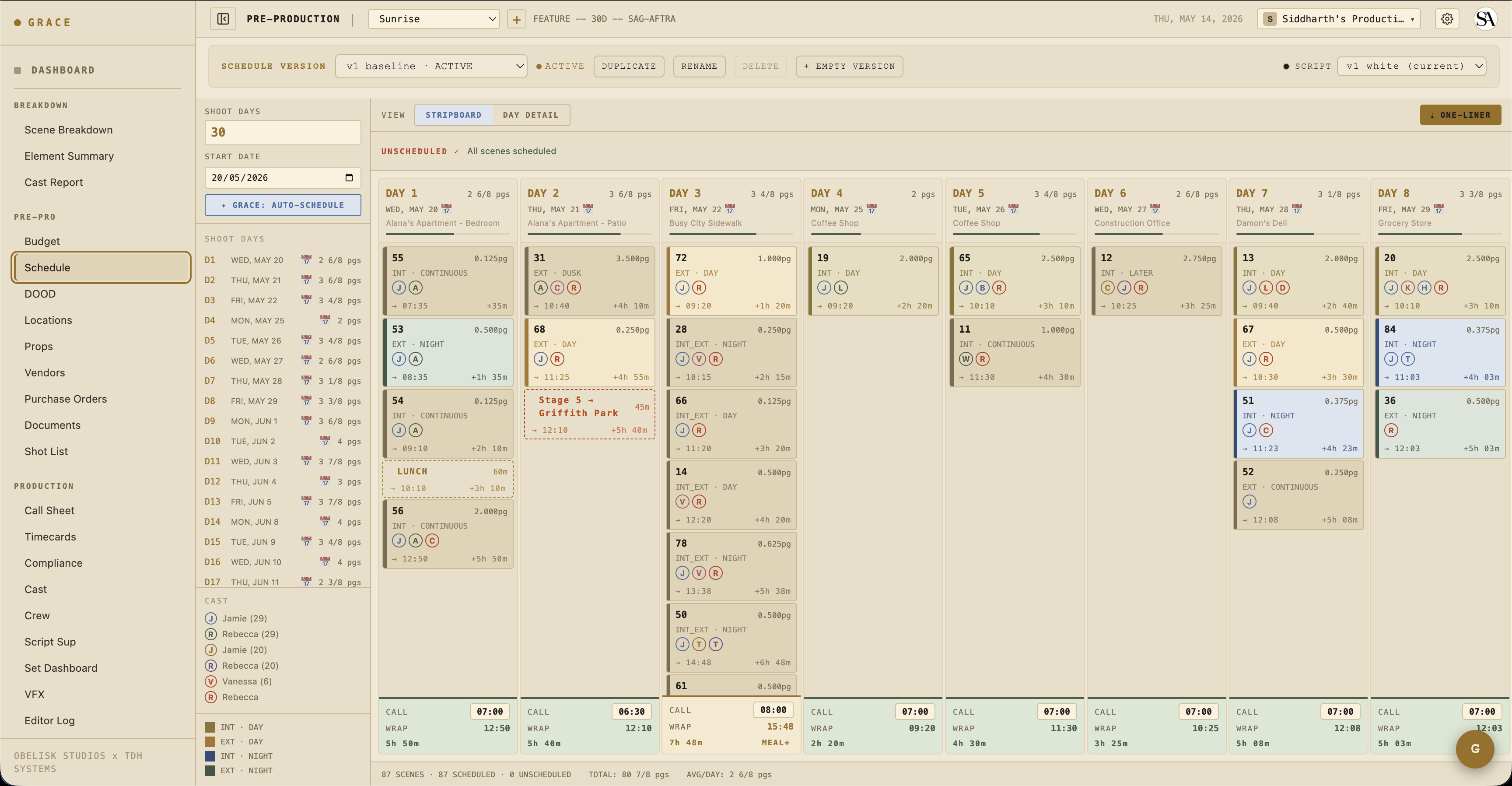
- Make sure the schedule has dates that match real-world reality. Schedule & Locations → Schedule.
- Bring up the crew + cast rosters and confirm everyone you expect is invited. Settings → Access for invites; Roster → Crew/Cast for the rosters themselves.
- If you're working with a 1st AD, hand them the keys — they'll live in Call Sheets and Set Dashboard.
What you do day-to-day
- Schedule — the strip-based shooting schedule. Drag scenes between days, add company moves, add lunch strips. See Pre-production.
- Budget — categories → accounts → lines → items. Items can be flagged
manual(locked from Grace's auto-cascades) orgrace(Grace re-suggests on data change). See Pre-production. - POs — Purchase Orders, one PO per budget line/item. Status cycles pending → approved → paid. Per-PO actuals roll up to the budget actuals card on the dashboard.
- Compliance — daily timesheet PDFs, exhibit G, turnaround waivers. See Compliance.
- Vendors — every PO points at a vendor. Vendor list lives at Budget → Vendors.
When you're handing off to the 1st AD
The 1st AD takes over once the schedule is locked. Their daily cycle is Call sheets → Set Dashboard → wrap. You're still on the hook for budget/compliance/POs in parallel, but the day-of-shoot pacing is the AD's responsibility.
Cards you live in
The per-production dashboard surfaces what you care about at the top — Compliance Flags, Call Sheet Status, Budget Snapshot, Crew/Cast on Set. The mix is curated for T1 roles. See Dashboard cards.
Next reads
- Pre-production — schedule, budget, locations, props, shot list.
- Compliance documents — the 8 doc types you'll generate.
- Timecards — Grace prefill math + dot conventions.