Billing & seats
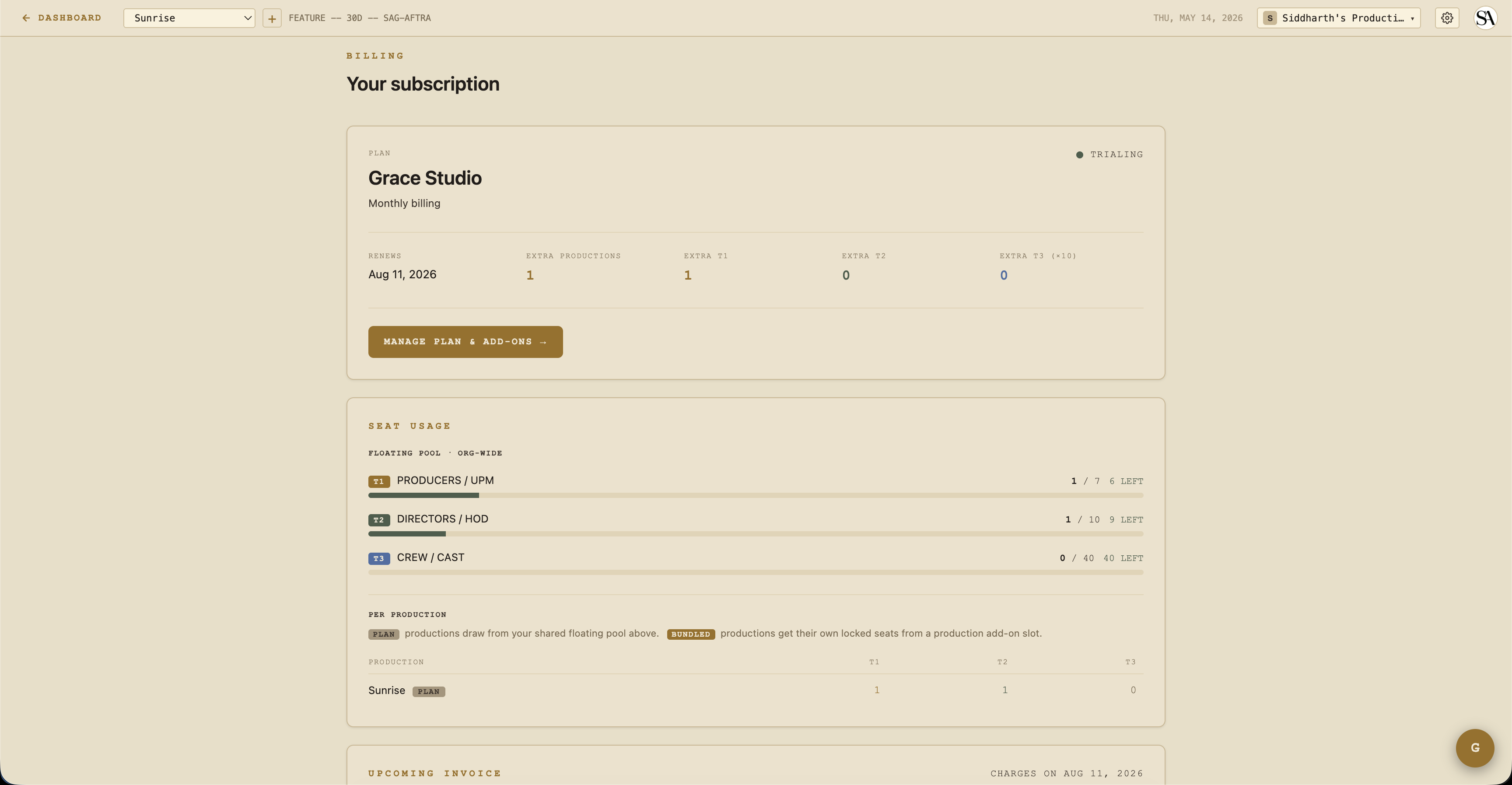
Grace's billing has three things to know:
- One subscription per organization, not per production.
- Two plans — Standard or Studio — with seat-pack and production-slot add-ons.
- Lapse, archive, and over-quota states — automated, surfaced in banners.
Plans
| Standard | Studio | |
|---|---|---|
| Productions included | 1 | 1 |
| T1 floating seats | 1 | 1 |
| T2 floating seats | 5 | 10 |
| T3 floating seats | 10 | 25 |
| Vault (screeners / dailies / DIT) | ❌ | ✅ |
| AI script parse | ✅ | ✅ |
| Compliance auto-generate | ✅ | ✅ |
| Price (monthly) | check /pricing | check /pricing |
| Price (annual) | ~17% discount | ~17% discount |
The Vault is the main feature gate. Without it, Standard customers see the four Vault sections in the sidebar with a STUDIO pill that opens an upgrade modal on click.
Add-ons
Beyond the included production slot + seats, you can add:
- Production slot pack — +1 production slot. Comes with a bundled-seat pool: 1 T1 + 2 T2 + 5 T3 seats specifically scoped to that production. Use case: launching a new show.
- T1 seat pack — +1 floating T1 seat. Use across any production in the org.
- T2 seat pack — +1 floating T2 seat.
- T3 seat pack — +1 pack = 10 T3 seats (10× multiplier —
t3SeatAddonUnits× 10).
Add-ons are mid-cycle subscription items. Stripe charges card on file with prorated billing.
Seat counting
When someone is invited to a production, they consume a seat from the org's seat pool. The pool is the sum of:
- Floating — included with the plan + floating seat-pack add-ons. Usable on any production.
- Bundled — included with a production-slot add-on, tied to that specific production.
When you invite someone, Grace decides which pool they draw from: bundled first (if the production is bound to a slot and bundled capacity exists), then floating.
If a member is in the bundled pool of a production and that production gets archived, they flip to the floating pool automatically (consuming a floating seat instead).
The over-quota state
Grace surfaces an OVER QUOTA banner when the org has more demand than capacity:
- Tier overflow — e.g., 4 T1 seats consumed but only 3 in the pool. Shows on a red banner with "ADD CAPACITY" + "REVIEW SEATS" buttons.
- Bindings overflow — more bound productions than addons paid for. E.g., 3 production slots in use but only 2 paid for. Triggers a 7-day → 30-day countdown.
The bindings overflow countdown
When you have more bound productions than addons:
- Day 0 — overflow detected. Banner: "Oldest bound production locks in 7 days."
- Day 7 — auto-lock. The oldest bound production becomes read-only (members keep access but can't write). Banner: "Locked production archives in 23 days."
- Day 30 — auto-archive. The locked production is archived; its slot frees up. Bundled members flip to the floating pool.
You can resubscribe before day 7 to clear the countdown — the lock is removed automatically when capacity catches up.
Production state machine
Each production has two states independent of its creative status:
- Locked — read-only freeze. Members still consume seats. Triggered by auto-overquota (countdown) or manual owner action.
- Archived — read-only, members excluded from seat counting, slot freed. Triggered manually or by auto-archive after 30 days locked.
Both states are reversible — unarchive / unlock from the production card.
When unarchiving, Grace re-checks seat capacity. If unarchive would result in overflow, you get a clear error showing the exact deficit per tier.
Lapsed billing state
Three statuses matter here, in order:
- Active / trialing — normal. Full access.
- Canceled / unpaid / payment failed — entered a 7-day grace period.
- Lapsed past grace — all sections org-wide drop to read-only. Owner status preserved so they can resubscribe.
The 7-day grace window is generous to handle "my card expired and I need to update it" gracefully without immediately locking the AD out mid-shoot.
Banner colors:
- Gold (warning) during grace — app stays writable, banner shows the grace expiry date.
- Orange (action required) past grace — writes blocked everywhere.
- The over-quota banner takes priority if both fire — over-quota is the more immediate issue.
Cancellation flow
Two ways to cancel:
Native cancel (recommended)
From Settings → Billing → CANCEL SUBSCRIPTION. You keep paid access through the current period. At period end, the org transitions to canceled status and enters the 7-day grace.
You can resume any time before period-end by clicking RESUME SUBSCRIPTION.
Customer Portal
For more advanced changes (some advanced add-on quantity adjustments not in the native UI) the Customer Portal lives on Stripe's hosted page. Direct your customers there from Settings → Billing.
Plan switching
Native flow at Settings → Billing → Plan. Click a plan card → confirm in the modal showing the proration preview. Changes apply with prorated billing.
Cycle switching (monthly ↔ annual) also swaps every add-on item to the matching cycle so you don't end up with a mixed-cycle subscription.
Add-on purchase / removal
From Settings → Billing → MANAGE PLAN & ADD-ONS. Click ADD on a seat-pack or production-slot card → confirm proration in modal → done.
Removal is more nuanced because removing a production slot when bound productions exist would create overflow. The modal handles this:
- Preview shows which productions would need to be archived.
- Pick the productions(s) to archive via a checkbox picker.
- Confirm — Grace archives them in one step before reducing the slot count.
Invoice history
Settings → Billing shows the 12 most recent invoices with both a hosted-page link (lets you see retries / payment status on Stripe) and a direct PDF download.
Owner-only writes
Every billing action is owner-only. Non-owners on a subless org pass through to whatever access they actually have (they're not gated by missing subscription — that's the owner's problem to fix). See Access control.
Test mode
Stripe is in test mode against app.theobeliskstudio.com (Obelisk-owned account, 6 products / 12 prices). Live-mode cutover is pending (entity-gated on LLC + EIN + business bank account). Coupons / customers / subs do NOT carry over — recreate everything in live mode when the flip happens.
Related
- Access control — how plans/lapses clamp access matrix.