Timecards
Dashboard → On-Set → Timecards. Per-day, per-crew/cast actuals. The dot system applies here heavily — the difference between Grace's prefill (blue) and a human override (gold) is the audit trail.
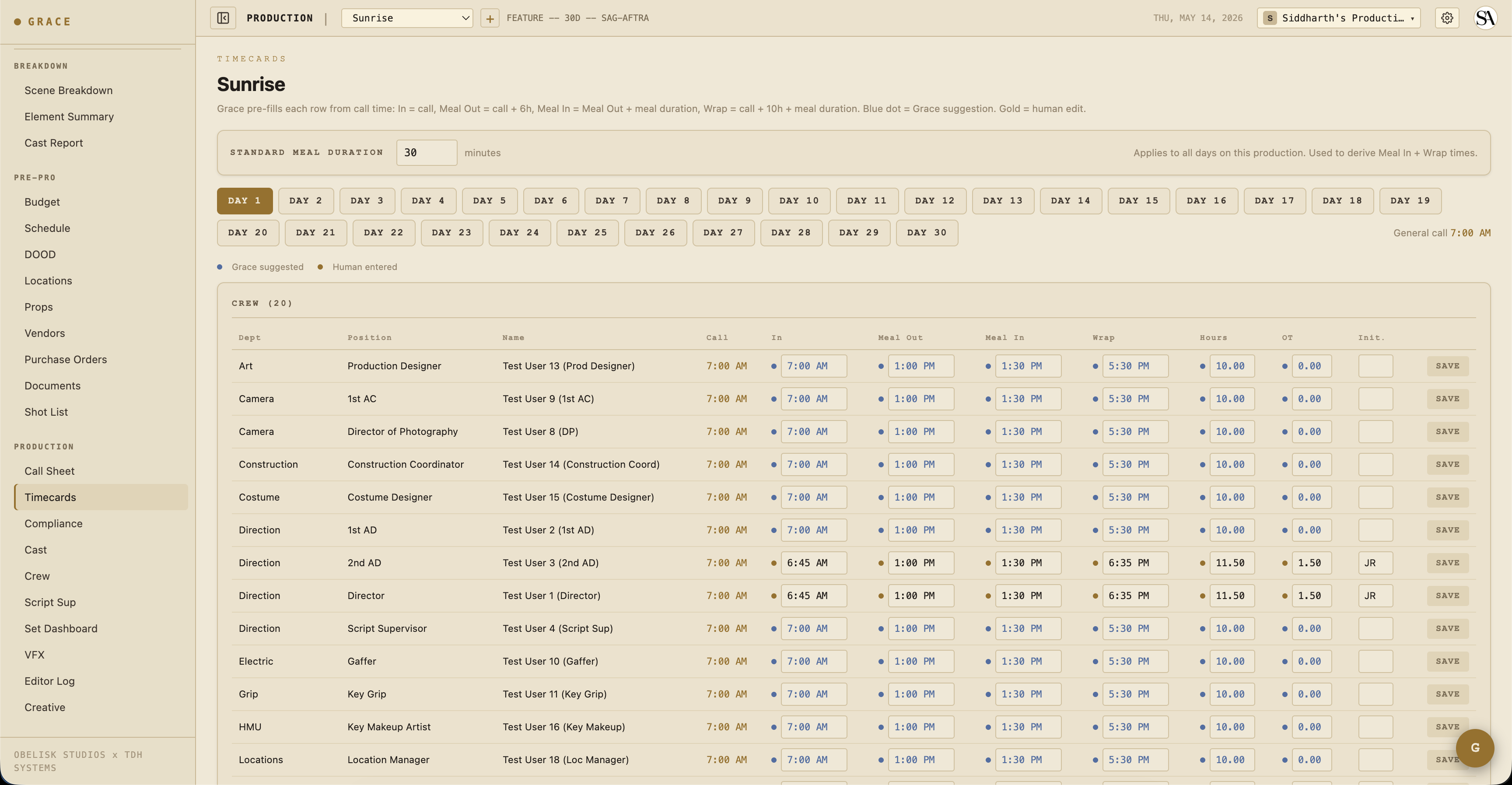
The dot convention
Each cell on the timecards page has two possible states:
- Blue dot + blue text — Grace's prefill. Computed at read time from the call time + meal duration.
- Gold dot + bold black text — Human override. Whoever filled this in (1st AD, typically) typed it.
Typing into a blue field turns it gold immediately. Clearing the field reverts to Grace's blue prefill.
Grace stores human overrides only. The suggestions are never written; they're derived at every read. So changing a production's meal duration retroactively updates every Grace-prefilled cell across the production — only the manual overrides stay put.
Grace prefill math
For a crew member with general call 07:00 and a 30-minute meal duration:
- In = call =
07:00 - Meal out = call + 6h =
13:00 - Meal in = meal out + meal duration =
13:30 - Wrap = call + 10h + meal duration =
17:30
For cast (the longer flow):
- Arrived = call − HMU mins (varies by character; default 30)
- Makeup in = arrived + 5 min
- On set = call (= shoot call)
- Meal out through wrap same as crew
- Dismissed = wrap + 10 min
The same math drives both the on-screen page and the printed timesheet PDFs — they can never drift.
Hours / OT calculation
- Total minutes = wrap − in. Handles wrap-past-midnight by adding 24h when end < start.
- Meal break minutes = meal in − meal out. Same wrap handling.
- Hours worked = (total − meal) / 60. Decimal to 2 places.
- OT hours = max(0, hours − 10).
Per-union profile, the OT threshold and meal threshold vary:
- IATSE: meal at 6h, OT at 10h, OT++ at 12h
- DGA: same
- SAG: meal at 6h, OT at 8h, OT++ at 10h (more aggressive)
- Non-union: meal at 5h, OT at 10h
Time input parsing
The input boxes accept multiple formats:
0710→07:10710→07:107:10→07:107:10 am→07:10710p→19:1019:10→19:10
Empty cells
If a cell is blank, Grace renders the blue prefill. If you want the cell to literally be empty (e.g., this person didn't take a meal), type a space or - and clear it explicitly.
Initials column
When you fill out a row's overrides, also add your initials in the Init column. This is the "this row was actually checked by a human" signal that flows through to:
- The daily timesheet PDFs (initials render bold next to override times).
- The DPR (Daily Production Report) summary.
Saving a row
There's no save button — typing into a cell saves on blur. The dot updates immediately. Network errors surface as a red border on the cell with a toast.
Daily Crew Timesheet / Daily Cast Timesheet PDFs
Generated from the compliance page per-day per-roster. PDFs mirror the page UI:
- Bold monospace for human overrides.
- Italic grey for Grace prefills.
- Initials column populated where overrides exist.
The same Grace math runs on the PDF side, so the printed timesheet always matches what's on screen.
Meal penalties
When the meal timer on the Set Dashboard's compliance footer crosses the union threshold (6h on IATSE), Grace automatically:
- Computes penalty minutes (= minutes past threshold).
- Counts penalty units (1 per 30 min past threshold).
- Logs a budget item to the meal-penalty line for that day (auto-creates if missing).
- Updates the budget actuals.
So a meal penalty isn't a manual entry on the timecard — it's tracked separately as a budget cascade. The Daily Crew Timesheet PDF includes a footer note when penalties were accrued for that day.
Forced calls + turnaround
When a call sheet is approved with a turnaround violation against the previous day's wrap, Grace automatically generates a Forced Call memo PDF and attaches it as a document. The crew affected (anyone scheduled both days) is listed.
The forced call memo doesn't replace the timecard — it's a separate document for compliance audit. The timecard still records the actual hours worked.
Who can see / edit timecards
The 1st AD (and anyone else with Call Sheets write access) can fill in timecards. Anyone with Call Sheets read access can view them.
T3 crew/cast don't see the timecards page at all — that section is hidden for them by default.
Related
- Compliance — turnaround / meal / OT / minor hours / French hours.
- The dot system — blue / gold / green colors.