VFX flagging + turnover
/dashboard/production/vfx. The VFX Supervisor's dashboard for flagging shots, tracking capture readiness, and exporting the turnover package at wrap.
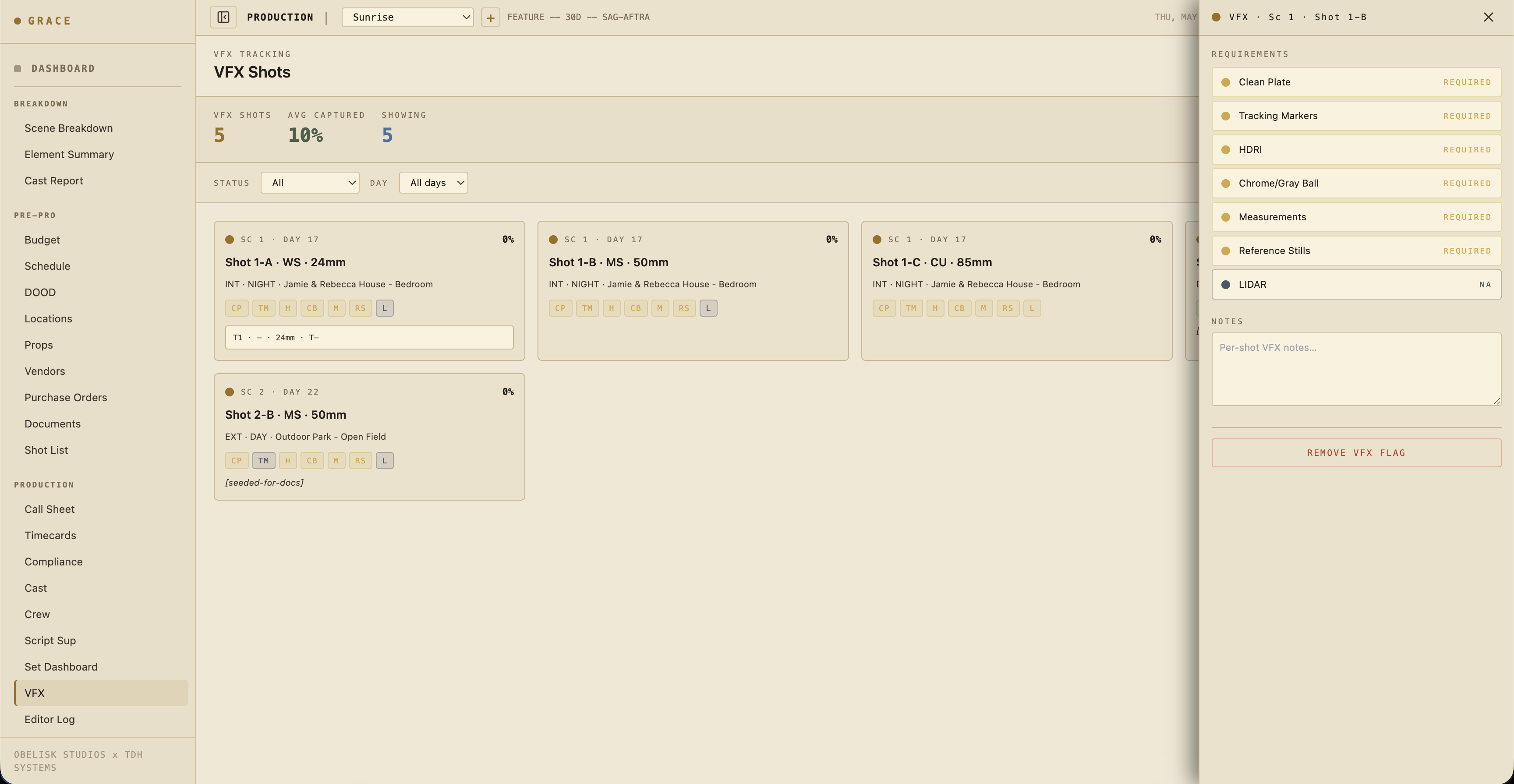
How VFX shots get flagged
Three ways a shot becomes "VFX" in Grace:
- Grace AI suggestion — Grace runs a pass over your shot list looking for visual descriptions matching VFX work ("monster steps out of the closet", "muzzle flash", "green-screen plate"). Suggested shots appear with a blue dot.
- VFX Sup flag — you manually tag a shot from the dashboard. Marked with a gold dot.
- Imported from a previs / turnover plan — bulk upload (on the roadmap).
Requirements per shot
Every flagged shot has 7 capture requirements with status required / captured / na:
- Clean plate — empty-frame plate of the same setup without actors. For background replacement / set extensions.
- Tracking markers — visible markers (tape, ping-pong balls) for 3D track.
- HDRI — light-probe panorama at the actor's position. For relighting in CG.
- Chrome + gray ball — chrome ball (specular reflection sample) + gray ball (diffuse light sample). For lighting reference.
- Measurements — physical set measurements / scale references. Sometimes a tape measure shot, sometimes drone-photo + plate.
- Reference stills — photos of the set, costumes, props from multiple angles. Used in the VFX bid + during the comp.
- LIDAR — 3D scan of set geometry. Often N/A for small productions; common on big-budget.
Plus a free-text notes field for shot-specific quirks.
Status cycle
Each requirement cycles: required → captured → na → required. Click the badge to advance. The dashboard's overall capture rate (the percent bar on the dashboard) is the ratio of captured to (required + captured).
Status colors
Borrowed from the dot system:
- 🔵 Blue — Grace suggested (this shot might be VFX). Visible, editable.
- 🟡 Gold — Human flagged or confirmed.
- 🟢 Captured — Requirement satisfied.
- ⚫ N/A — Doesn't apply (e.g., no LIDAR on a small indie).
The flag detail panel
Tap a flagged shot to open the requirements panel. Editable inline. Below the requirements, the panel shows:
- Linked take data — circled take's camera report (focal length, t-stop, filter, focus distance, lens distortion grid if measured). Pulled from the Script Sup's logged takes.
- Linked dailies clips — once the DIT package is delivered, the clip's file name links here so the VFX team can pull the source.
- Scene context — INT/EXT, time of day, location, description.
Daily workflow on set
For each flagged shot the day it shoots:
- Confirm the scope — does the requirements list match what the VFX team needs? Update if the team's scope changed since pre-pro.
- Capture the references — clean plate, HDRI, chrome/gray ball, etc. as the AD calls for them between takes.
- Tick captured as each is done. Don't wait until end-of-day to update — it's easy to lose track.
- Notes — write down anything that'll save the VFX team time: "actor's hand crosses screen-right at 4:12", "fan blowing curtain SR, possible mark", "muzzle flash captured frame 47".
VFX turnover at wrap
At end of show, generate the VFX Turnover PDF from the dashboard (button top-right). Per-shot:
- Scene number + scene context
- Shot number + description + assigned camera setup
- Requirements status (captured / na / required — anything not captured will surface as TBD on the turnover doc)
- Circled take camera report
- Linked dailies clip filename (for editor → VFX team handoff)
- Per-shot notes
This PDF goes to the VFX vendor (or in-house VFX team) along with the dailies. The dailies clips themselves stream from the Vault.
Status spread on the dashboard
The dashboard at a glance:
- Today's VFX shots — flagged shots scheduled today, with
required vs capturedcount. - Production-wide queue — Required / Captured / N/A counts across all flagged shots.
- Capture rate bar — green bar; 100% means everything VFX-ready.
What you can't do here
- Reviewing/approving the actual VFX shots after delivery isn't in Grace — that's a separate pipeline (Frame.io, ftrack, ShotGrid).
- Lens distortion grid capture has a dedicated workflow in some productions but isn't templated in Grace yet.
- On-set previs viewer (loading a PV sequence inline with the shot) is on the roadmap.
Next
- Editor log — circled takes show up here too, separately from the VFX queue.