Set Dashboard
/dashboard/production/set. The single page the 1st AD lives on during a shoot day, plus a handful of companion cards that make it useful to everyone else on set too.
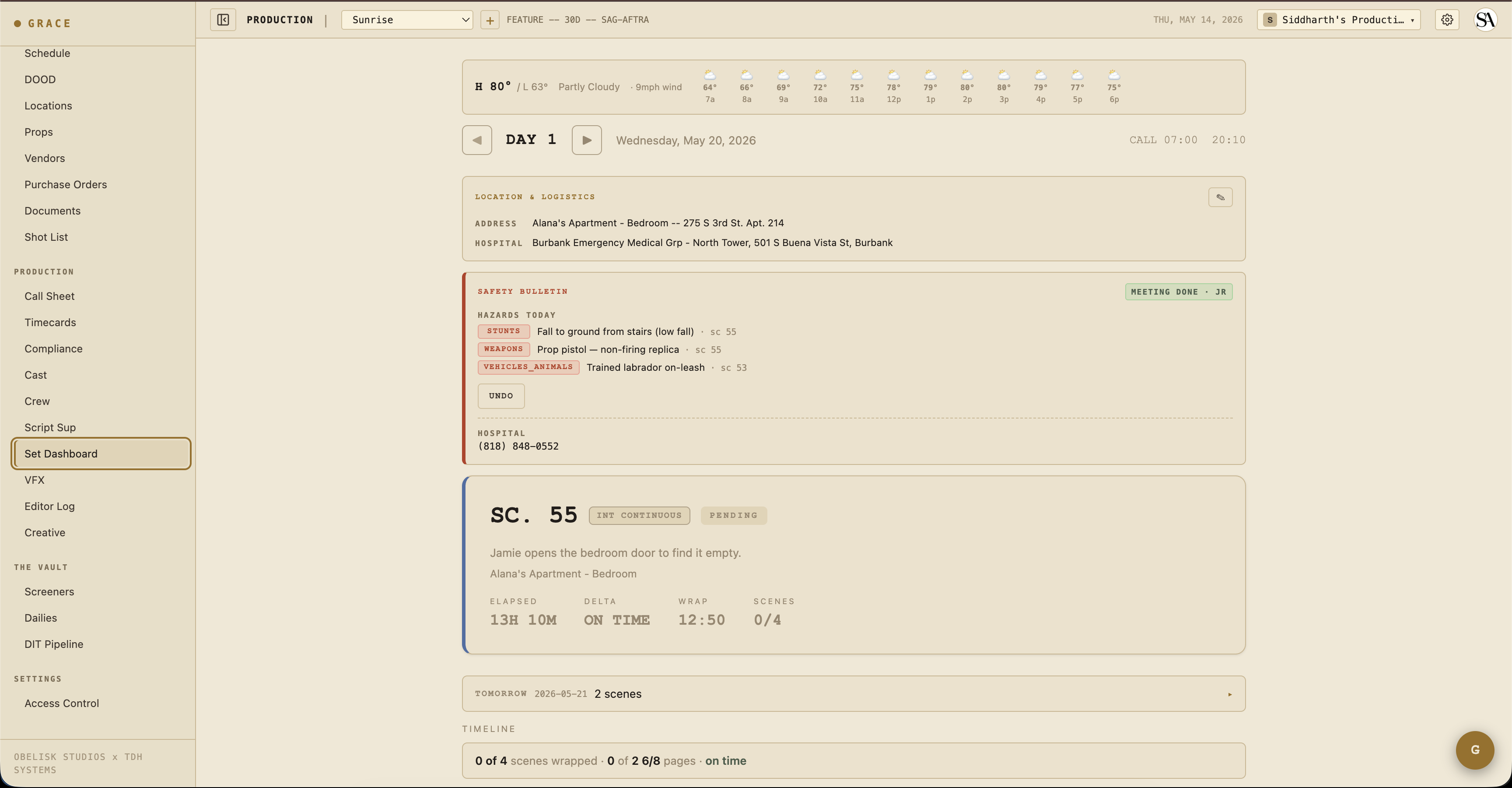
The page is built around the strip timeline — your day, top to bottom, in shooting order. Each strip is a scene (or a meal, a company move, a stunt rehearsal). You mark strips prepping → shooting → wrapped as the day goes. Grace updates the projected wrap time in real-time as you do.
Top of the page
The companion cards above the day header surface things every department needs to know quickly:
Weather strip
A banner with current temp + condition + wind, an hourly icon row across the shoot window, and a sunset countdown when today has EXT scenes. If precipitation crosses 40% within the shoot window and you're scheduled for EXT, you get a "RAIN AT 3PM" alert.
Driven by Open-Meteo (free, browser-side fetch). Requires the day's primary location to have lat/lon geocoded — set this at Schedule & Locations → Locations.
Day header
Day number (DAY 1 of 30), date, current time, general call. Day-stepper navigates between days for review.
Turnaround warning
A red banner appears if the previous day's wrap puts today's call inside the union turnaround minimum. The hours-shortfall is displayed. (A Forced Call memo PDF was auto-generated when this was first approved — see Compliance.)
Location & Logistics
Address, hospital, base camp, crew parking, holding area, Wi-Fi creds, catering location/time. Editable inline by callSheets:write roles (the AD).
Safety Bulletin
Today's hazards (stunts / SFX / pyro / weapons / firearms / animals / water / heights / aerial elements) listed as red chips. A MARK MEETING DONE button captures initials + timestamp, then displays a green chip ("MEETING DONE · JR · 7:15 AM"). Emergency contacts strip below — medic / fire / police / hospital phone numbers, each a tel: link.
Safety meeting state is production-wide — once one AD marks it done, everyone on the production sees the same green chip with the same initials.
Middle — the hero card
The hero card is the current scene. Big scene number, brief description, slate-style strip color border (blue INT-DAY / green EXT-DAY / etc.). When the current strip status is prepping, the border is gold; shooting, green; wrapped rolls forward to the next.
Below the hero is Wrap notes — the AD's notes that flow into the DPR (Daily Production Report).
Tomorrow at-a-glance
A collapsible card between hero and timeline showing tomorrow's call time + scene previews, plus a peek at the day after.
Company moves
When today's schedule has a company move or travel strip, an orange-bordered banner emphasizes it above the timeline so it doesn't get lost. Depart time + duration + destination + notes.
Timeline
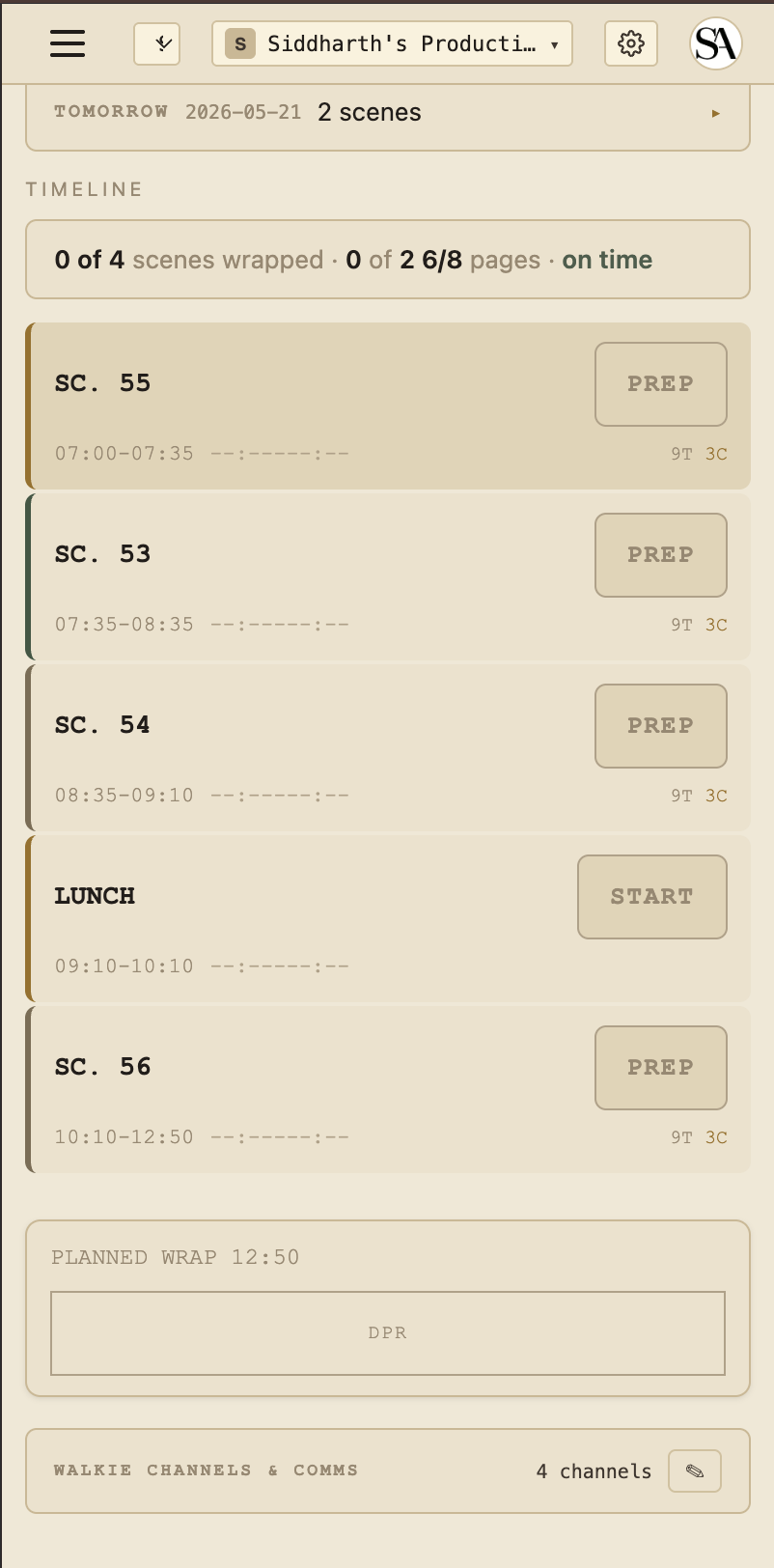
Each row is a strip. Left to right:
- Strip color bar — INT-DAY / EXT-DAY / INT-NIGHT / EXT-NIGHT for scene strips; meal / move / custom colors for non-scene.
- Scene number or strip label (LUNCH, COMPANY MOVE, STUNT REHEARSAL, etc.).
- Description — for scene strips, the scene synopsis.
- Take counts —
4T 2Cmeans 4 takes shot, 2 circled. - Delta vs planned —
+12mred = 12 min over planned;-5mgreen = 5 min under. - Status button — PREPPING (gold) → SHOOTING (green) → WRAPPED (faded) → click to cycle.
Progress narrative
Above the timeline, one human sentence summarizing the day:
"4 of 6 scenes wrapped · 2 1/8 of 5 1/8 pages · running 22 min behind"
Derived from the wrap state + page counts + projected delta.
Bottom — compliance footer
The compliance footer (gold-on-black bar at the bottom) shows live state only when you're viewing today's shoot day. Off-day previews show only PLANNED WRAP HH:MM.
When on today:
- Meal timer — minutes since call (or since last meal end). Turns gold at 5h30m, red past 6h (IATSE threshold). Once in penalty, a meal penalty automatically logs to the budget (mealpen:dayN account).
- OT — accumulated work minutes. Buckets: OK (under 10h), MEAL+ (over 6h), OT+ (over 10h), OT++ (over 12h). Bucket determines budget OT cascade.
- Projected wrap — current time + remaining strip durations + delta vs planned. Color = green (ahead), gold (slightly behind), red (significantly behind).
- DPR button — Generate the Daily Production Report PDF. Includes wrap time, scenes completed, page count, top notes, compliance summary.
Walkie channels
Collapsible card at the bottom showing per-department walkie channel mapping ("CH1: production, CH2: camera+1, CH3: G&E") + a crew chat link (WhatsApp / Slack). T1/T2 can edit inline (pencil → flip → save). T3 read-only.
Mobile
The Set Dashboard works on mobile (cards stack to single column). The desktop version is more usable on a 12-hour shoot day — most ADs run it on a laptop in video village.
Off-day previews
When you scroll to a different shoot day via the day-stepper:
- Compliance footer goes static (
PLANNED WRAP HH:MMonly — no meal timer, no live OT) - Strip timeline still rendered with planned times
- All other cards work as expected
This is intentional — the wall-clock vs the day's general call only makes sense when you're physically on that shoot day.
Mobile screenshot
Next
- Compliance — the 8 doc types and how they integrate with the set day.
- Timecards — capture actuals at wrap.
- Editor log — circled takes flow downstream.